The New Mexico Oil Conservation Division (OCD) keeps its scanned regulatory paperwork in an imaging system that holds over 4 million documents [1]. Drilling permits, sundry reports, completion reports, wireline logs, orders and hearing case records are there to browse, view and download [1]. For landmen, mineral owners, buyers doing due diligence and compliance staff, it is the agency’s own copy of what an operator actually filed.
Finding a document there is harder than the size of the archive suggests. The archive is split across seven separate searches, and the three order and case searches add a text search that finds documents containing given words [1]. No imaging search has a lease or OGRID field, and result thumbnails are captioned with a file size and a date [1]. Operator files sit in a second system, OCD Permitting, under Operator Details, Associated Images, where available, behind a human verification check [1].
This post shows what each search holds and accepts, with a link to each one. It then works through how to get from what you know to the document, and where to find the identifiers the searches ask for.
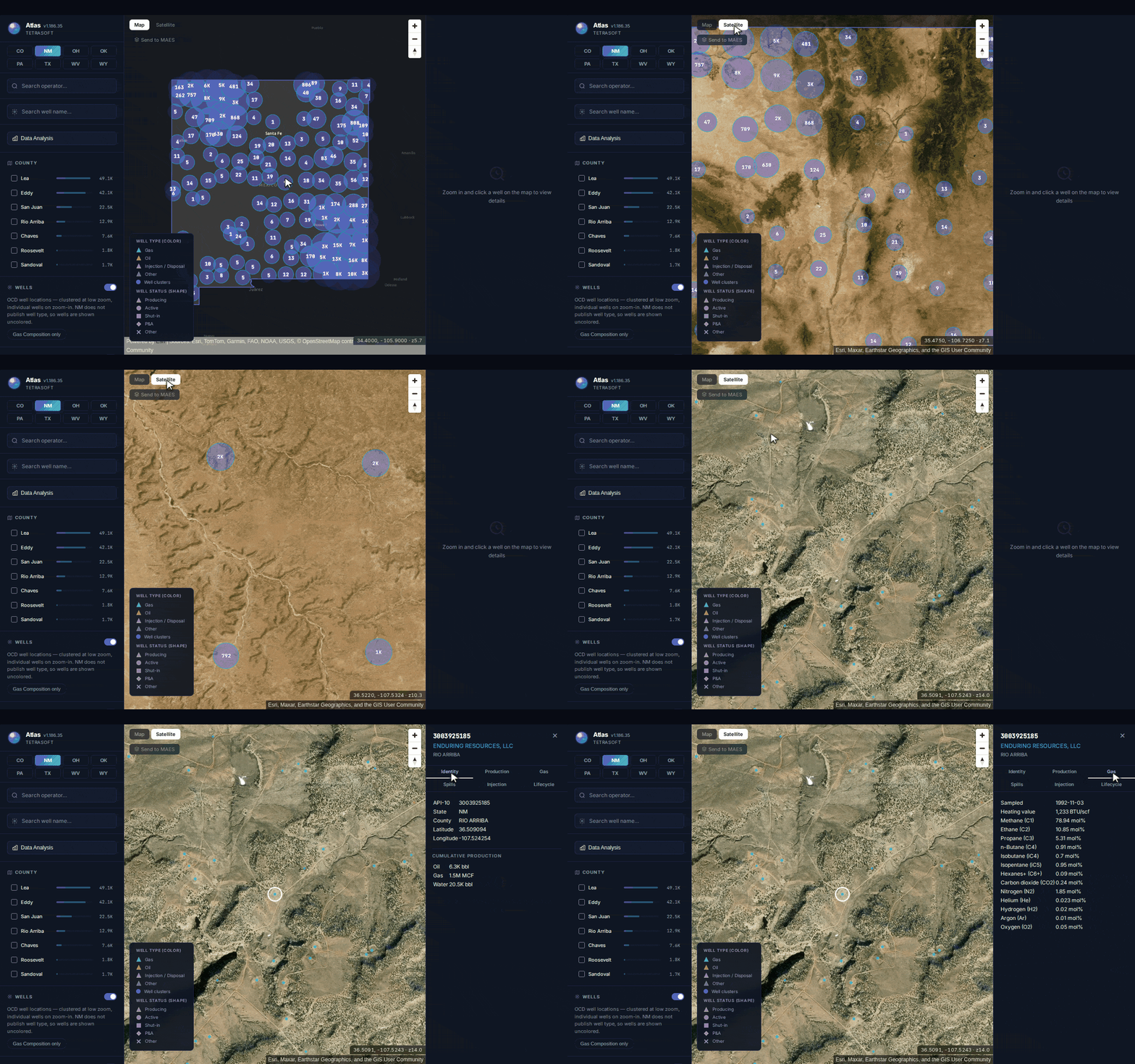
The identifiers are the part TetraSoft Atlas supplies, our subscription platform joining well, production, emissions and enforcement records where each state publishes them [2]. It puts more than 140,000 New Mexico well records on one map [2].
Atlas is free to try for seven days, with no credit card required [3].
Quick Answer: OCD Imaging at ocdimage.emnrd.nm.gov/imaging holds over 4 million scanned documents across seven searches [1]. Well, log, incident and facility files are found by an identifier, a name or a location [1]. The four file searches have no text-search field; the three order and case searches do [1]. Start from the API number, operator name or section, township and range you hold.
What OCD Imaging Actually Holds
The system is one archive with seven front doors, and the door decides what you can ask. Choosing the wrong one returns “0 Records Found”, which looks the same as a document that was not filed.
Seven Searches, and What Each Will Take
Four of the seven searches are filed against a single thing: a well, a well’s logs, an incident or a facility [1]. Well Files carry “OCD regulatory documents for a single well including drilling permits, sundry reports, completion reports, letters, etc” [1]. Log Files carry “electric wireline logs run in a well and submitted to the OCD” [1].
The other three hold orders and case records rather than well paperwork [1]. Administrative and Environmental Orders hold “OCD administrative orders such as NSL, DHC, WFX, NSP and others” [1]. Hearing Orders hold orders issued after a public hearing, and Case Files hold the official record of a case, including transcripts and exhibits [1]. The table links each search and names the main starting points its form accepts; each form offers further filters such as dates and county.
| Search | What it holds | Starts from | Text search |
|---|---|---|---|
| Well Files | Permits, sundries, completion reports, letters for one well | API number; well, operator or pool name; section, township and range | No |
| Log Files | Wireline logs for one well | Same fields as Well Files | No |
| Incident Files | Permits, assessments and remediation plans for one incident | Incident ID; incident, operator, well or facility name; admin order; location | No |
| Facility Files | Permits, reports and letters for one facility | Facility ID; facility or operator name; admin order; location | No |
| Administrative & Environmental Orders | Administrative orders and environmental permits | Order number or application ID; API number; operator, entity, pool or facility name; location where attached | Yes |
| Hearing Orders | Orders issued after a public hearing | Order or case number; applicant name; primary pool; county | Yes |
| Case Files | Pre-hearing documents, transcripts and exhibits | Case or order number; applicant name; primary pool; county | Yes |
Main starting fields from each search’s criteria form, read on 29 September 2026; forms also offer case type, county and dates. [1]
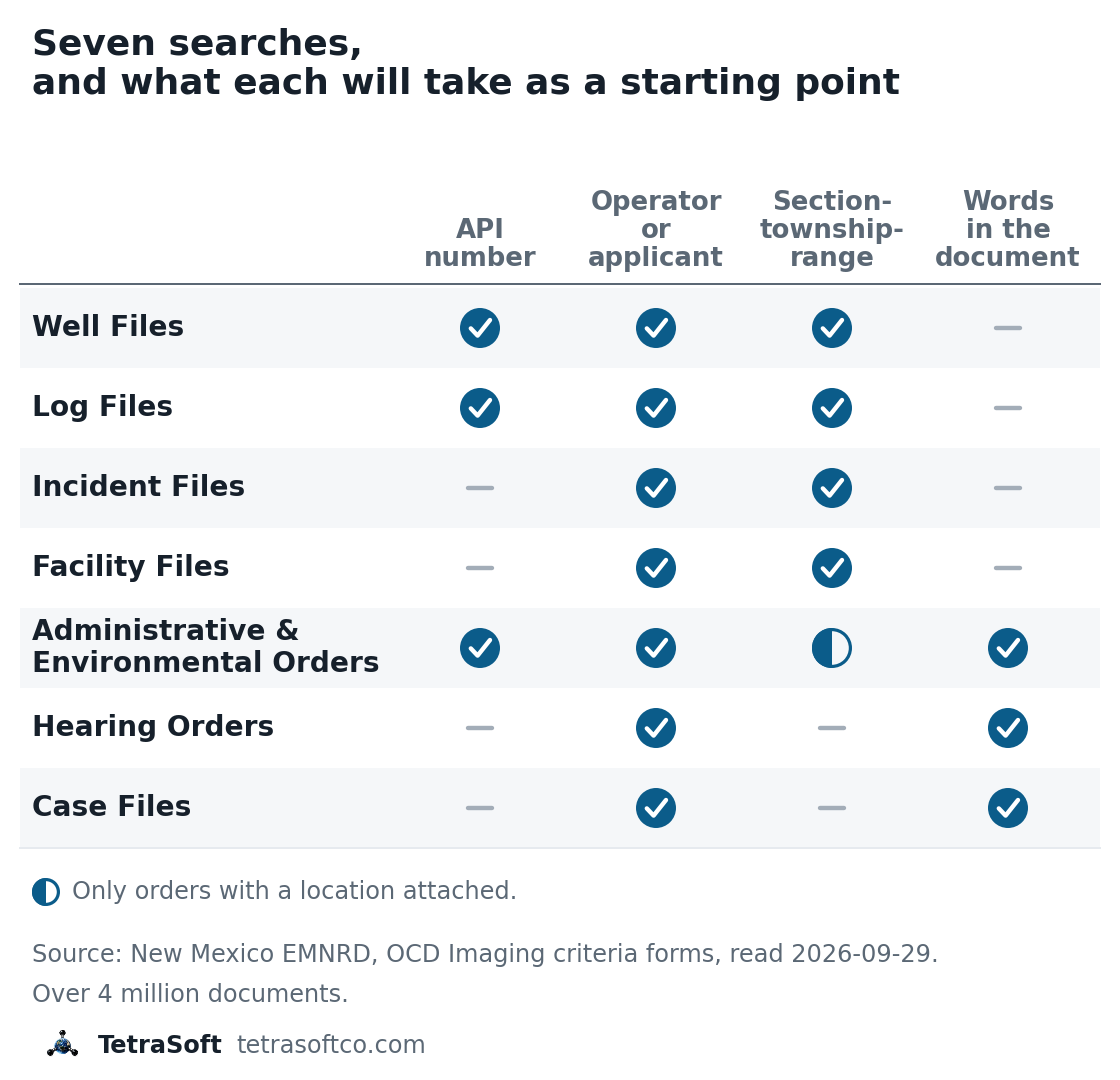
Three of the seven searches read the words in a document; the four file searches do not. [1]
Three Searches Read the Words, Four Do Not
The three order and case searches each carry a text search box [1]. It accepts AND and OR, a minus sign to exclude a word, exact phrases in quotes, and * wildcards [1]. A question such as “which orders mention this pool” can be asked there directly.
Well, log, incident and facility files have no text box [1]. A question shaped as “which wells have a document mentioning X” cannot be answered for those files. A question shaped as “what is on file for this well” can be answered immediately.
How to Get to a Document
Every successful search starts from something you already have, so the work is matching what you hold to a door that accepts it. The tool below takes the document you want and what you know, and returns the search to use.
The Well File Search Takes Four Kinds of Name
The well file search accepts an API number, a well name, an operator name or a pool name [1]. The API number goes in as 30-045-01234, and each name takes an exact, contains, begins-with or ends-with match [1]. Unit letter, section, township, range, county and district are available too, with the districts Hobbs, Artesia, Aztec and Santa Fe [1]. A scan date field takes an exact, before or after date [1].
Results come back as thumbnails, each captioned with a file size and the date the document was scanned into the archive [4]. You open each one to see which form it is. A View All button downloads all of the well’s documents as a single file [1]. How to read the API number itself is covered in API Well Number Lookup: What It Is and How to Read One.
Orders Take an Operator, a Pool or a Phrase
The order search accepts an operator name, an API number and a pool name, as well as an order number [1]. It also takes a location, but that search “returns the few Administrative Orders for which locations have been attached” [1]. A company name or a pool is therefore the likelier key for orders, since few orders carry a location.
Hearing orders and case files are found by case or order number, by applicant name, or by the text search [1]. Finding the wells in the first place is covered in NMOCD Well Search: Map Every New Mexico Oil & Gas Well.
Where the Starting Point Comes From
The archive mostly assumes you arrive holding an identifier, a name or a location; only the order and case searches also take free text. For one known well that is easy, and the OCD’s own map links each well to its scanned well files [5]. Leases are harder, since no search accepts one; an operator’s wells in a county return as a list, opened one well at a time.
Every New Mexico Well Carries Its Location String
New Mexico writes a well’s location as a unit letter, section, township and range, in the form F-19-11N-04E [6]. Those four parts match the unit letter, section, township and range fields the file searches ask for, beside county and district [1]. All 142,229 well records in the OCD’s public well layer on 29 September 2026 carry a location string and an API number beginning 30 [6]. About 17,000 of those records are cancelled permits for wells that were never drilled [6].
| County | OCD well records | API county code |
|---|---|---|
| Lea | 49,127 | 025 |
| Eddy | 42,159 | 015 |
| San Juan | 22,445 | 045 |
| Rio Arriba | 12,861 | 039 |
| Chaves | 7,555 | 005 |
The five counties with the most records, counted from the OCD’s public well layer, 29 September 2026; the other counties hold about 8,000.
A Map Supplies the Identifier the Search Asks For
TetraSoft Atlas, the map of New Mexico wells shown above, does not hold the scanned documents, and it is not trying to. What it holds is the identifier the archive asks for: the API number, operator name and location string of each New Mexico well [2].
No imaging search filters by form type, so knowing which form to expect tells you what to look for among the results [1]. A drilling application is a C-101, the location plat a C-102 and a sundry notice a C-103 [7]. The completion report is a C-105, while the C-115 operator’s monthly report is filed electronically through OCD Permitting [7].
Treat an empty result as unconfirmed. Before concluding a filing does not exist, try the same well under a different search, and try the location rather than the name. Older paper may also predate what was scanned, which the system does not distinguish from a gap.
Reconciling a company to its wells and an area to its townships is where the time goes. The TetraSoft Atlas Dashboard has that join done, with production history beside each New Mexico well’s API number, operator and location [2]. How the permits themselves are found is covered in NMOCD Permitting: Find and Map New Mexico Drilling Permits.
Frequently Asked Questions
Which OCD district is my well in?
The well file search offers four districts: Hobbs, Artesia, Aztec and Santa Fe [1]. The district is a separate search field, and each well’s record lists it beside the county, so it narrows results rather than identifying a well. Picking the wrong one returns nothing rather than an error.
How do I find out who is drilling near my land in New Mexico?
Search Well Files by the section, township and range of your land, or click the wells on the OCD’s own map [5]. Each well record names its operator [1]. The location search matches a well by its surface location, the pad where it was drilled [8]. A horizontal well drilled from a pad in the next section can run under your land and still list under that pad’s section.
For a new well, the C-102 Well Location and Acreage Dedication Plat shows its surface and bottom-hole locations and the acreage dedicated to it [7].
Can I search OCD Imaging by lease or OGRID number?
Not by a field, though the order text searches find an OGRID number written in an order [1]. The seven imaging search forms have no field labelled lease or OGRID [1]. Search by operator name instead, or look the operator up in OCD Permitting, where operator files sit under Operator Details, Associated Images, when accessible [1].
References
- New Mexico EMNRD, OCD Imaging. New Mexico Energy, Minerals and Natural Resources Department, Oil Conservation Division. https://ocdimage.emnrd.nm.gov/imaging/
- TetraSoft Atlas, New Mexico well records. TetraSoft Atlas map of New Mexico Oil Conservation Division well records. https://www.tetrasoftco.com/atlas-landing.html
- TetraSoft Atlas landing page, tetrasoftco.com/atlas-landing.html, accessed September 29, 2026. https://www.tetrasoftco.com/atlas-landing.html
- New Mexico EMNRD, OCD Imaging, scan date search test, 30 September 2026. Well Files search for 30-025-35000 by scan date returns the well only on the dates its thumbnails show. https://ocdimage.emnrd.nm.gov/imaging/WellFileCriteria.aspx
- New Mexico EMNRD, NM OCD Oil and Gas Map User Guide. https://www.emnrd.nm.gov/ocd/wp-content/uploads/sites/6/OCD-Public-Web-Mapping-Application-User-Guide.pdf
- New Mexico EMNRD, OCD Oil and Gas Wells map layer. OCDView Wells_Public layer, queried 29 September 2026. https://gis.emnrd.nm.gov/arcgis/rest/services/OCDView/Wells_Public/FeatureServer/0/query?where=1%3D1&returnCountOnly=true&f=json
- New Mexico EMNRD, OCD Forms. New Mexico Energy, Minerals and Natural Resources Department, Oil Conservation Division. https://www.emnrd.nm.gov/ocd/ocd-forms/
- New Mexico EMNRD, OCD Imaging, location search test on well 30-025-45831, 30 September 2026. The well lists under its surface section 35-25S-32E, not its bottom-hole section 2-26S-32E. https://ocdimage.emnrd.nm.gov/imaging/WellFileCriteria.aspx
Interactive tool
Will what you know reach that document?
OCD Imaging holds over 4 million documents across seven searches. Each is filed under a well, an incident, a facility or a case, and only the order and case searches can also look for words in the document. Pick what you want and what you have.
Reachable from what you have
Yes
Well Files takes an operator name.
- Search that holds it
- Well Files
- Criteria page
- WellFileCriteria.aspx
What that search is for
OCD regulatory documents for a single well including drilling permits, sundry reports, completion reports, letters, etc.
What its form takes
API number, well name, operator name, pool name, location (unit, section, township, range), county, district, scan date
Your location, as the form asks for it
Enter a location string above and this will split it into the four fields the form asks for.
Searches, descriptions and fields from the OCD Imaging criteria forms. All seven criteria forms were read on 2026-09-29; none has a lease or OGRID field. The OCD's own web map also links each well to its scanned well files. Nothing leaves your browser.
Comments
0Share your thoughts. All comments are moderated before appearing.
No comments yet. Be the first to share your thoughts!